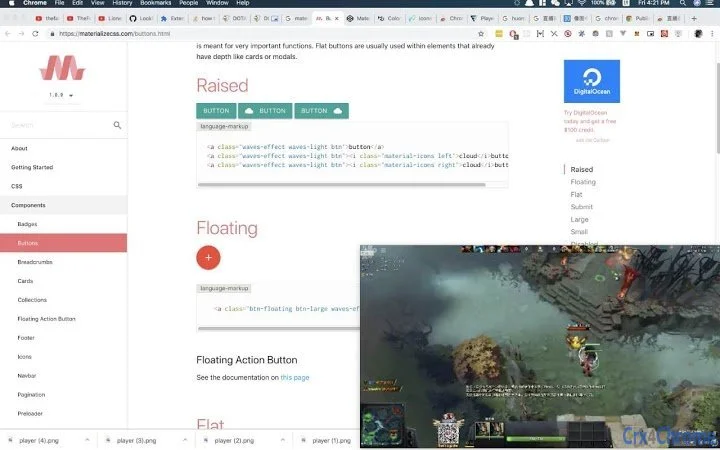

Stream in Picture-in-Picture Mode with Ease
Overview
The software enables users to watch live streams and video content in picture-in-picture mode directly through the Chrome browser. By leveraging the native Picture-in-Picture API provided by Chrome, it allows seamless playback of videos from supported platforms such as Douyu, Huya, Huomao, YouTube, Tencent Video, and iQiyi. This functionality is particularly useful for multitasking, enabling users to keep video content visible while working on other tasks. The tool is designed for individuals who frequently engage with online video platforms, especially those who follow live streamers or consume a variety of video content across different websites.
It is especially beneficial for users who rely on browser-based video players, as it supports any site using HTML5 video players. The software operates as a browser extension, requiring no installation beyond Chrome’s extension management system. Users can activate picture-in-picture mode with minimal interaction, making it ideal for both casual viewers and power users who value efficiency and convenience. The developer did not provide additional background information beyond the project’s GitHub repository and social media contact.
Key Features & Capabilities
- Picture-in-Picture Support for Major Platforms – Enables picture-in-picture playback on Douyu, Huya, Huomao, YouTube, Tencent Video, iQiyi, and any website using HTML5 video players.
- Seamless Browser Integration – Functions as a Chrome extension, integrating directly into the browser without requiring external software or complex setup.
- Automatic Video Detection – Identifies video elements on supported sites and provides a one-click option to enter picture-in-picture mode.
- Regular Updates and Improvements – The latest version (1.11) includes enhanced detection methods for Douyu’s video tag, improving reliability on that platform.
- Community-Driven Development – Users can submit suggestions or report bugs via GitHub or the developer’s Weibo account, fostering transparency and user involvement.
These features allow users to maintain visibility of live streams or videos while browsing, working, or managing multiple applications. For example, a user watching a live stream on Douyu while researching can keep the stream visible in a small floating window. Similarly, someone reviewing video content on YouTube for work can keep playback active without switching tabs. The tool is particularly effective for content creators, stream viewers, and remote workers who rely on multitasking.
User Interface, Workflow & Performance
The interface is minimal and designed to work within the Chrome browser environment. No separate application window is required; the extension integrates directly into the browser’s UI, typically appearing as an icon in the toolbar. Users can activate picture-in-picture mode with a single click on the video element, triggering the browser’s built-in Picture-in-Picture API.
Navigation is straightforward, with no complex menus or settings. The workflow is optimized for speed and simplicity, allowing users to switch between tasks without interruption. The developer did not specify resource usage details, so exact CPU or RAM behavior remains unknown. Performance observations are based on general software behavior patterns. Stability is expected to be consistent with Chrome’s native API, though real-world performance may vary depending on the user’s system and browser load.
Compatibility & System Requirements
The software is compatible with Windows, Mac, and Linux operating systems, ensuring broad accessibility across desktop environments. It is designed as a Chrome extension, meaning it requires the Google Chrome browser to function. The installation size is 1.2 MB, indicating a lightweight footprint with minimal impact on system resources.
Exact system requirements were not listed. Compatibility information was partially provided. Users should ensure they are running a supported version of Chrome, though the specific version range was not specified. The extension does not require administrative privileges for installation, and no additional software dependencies are required.
Pros and Cons
Pros
- Lightweight at only 1.2 MB
- Supports major streaming platforms including YouTube, Douyu, Huya, and Tencent Video
- Easy one-click activation for picture-in-picture mode
- Regular updates with improvements to video detection
- Open and transparent development via GitHub and Weibo
Cons
- No official support for browsers other than Chrome
- Exact system requirements not specified
- Performance behavior under heavy load not documented
- Dependent on Chrome’s Picture-in-Picture API, which may vary by version
- Only available as a Chrome extension, limiting cross-browser use
FAQ Section
Is this software compatible with browsers other than Chrome?
The software is designed exclusively for Google Chrome. It does not support other browsers such as Firefox, Edge, or Safari.
Is the software safe to use?
As a Chrome extension, it operates within the browser’s security model. It does not collect personal data or install additional components. Users should only install extensions from trusted sources, such as the Chrome Web Store or the official GitHub repository.
How often are updates released?
Updates are released periodically, with the latest version (1.11) focused on improving video detection on Douyu. The development team actively addresses issues and welcomes community feedback.
Can I use this tool offline?
Yes, the tool functions when viewing videos offline, provided the video content is already cached or loaded locally. However, it relies on the browser’s Picture-in-Picture API, which may not be available in offline mode depending on the browser’s implementation.
What kind of license does this software use?
The software is free to use and distributed under an open-source license. Users are encouraged to contribute, report issues, or suggest improvements via GitHub.
Final Thoughts
This Chrome extension offers a practical and efficient solution for users who want to enjoy video content in picture-in-picture mode across multiple platforms. Its lightweight design, broad compatibility with major streaming sites, and regular updates make it a valuable tool for stream viewers and multitaskers alike. While it is limited to Chrome and lacks detailed system specifications, its core functionality is reliable and well-executed. The open development model adds transparency and trust, making it a standout choice among browser-based video tools.
Download Stream in Picture-in-Picture Mode with Ease now.







